




Scam Alert: Fake Social Security Email Targeting Tax Season Anxiety
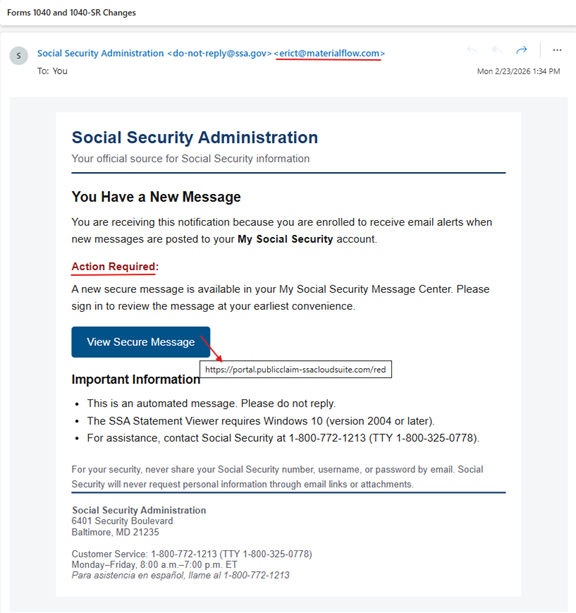
Example of a Phishing Email
Tax season brings paperwork, refunds, and, unfortunately, a surge in phishing scams. I recently reviewed an email claiming to be from the Social Security Administration (SSA). At first glance, it looked official. A closer inspection revealed multiple red flags that clearly identify it as a phishing attempt.
Let’s break it down so you know exactly what to watch for.
The Subject Line
“Forms 1040 and 1040-SR Changes”
This is a smart psychological hook:
- References IRS tax forms
- Creates urgency during tax season
- Suggests official government communication
Scammers love timing attacks around deadlines and financial stress.
Red Flag #1: Sender Address Mismatch
The email claims to be from: Social Security Administration <[email protected]>
But the actual sending address reveals: [email protected]
Additionally, the mail routing shows it originated through a marketing platform domain. Government agencies do not send secure account alerts via third-party bulk marketing platforms.
Red Flag #2: Suspicious Link Destination
The email urges the recipient to “View Secure Message” but the link points to: portal.publicclaim-ssacloudsuite.com
This is NOT an official government domain. Official SSA domains include:
- ssa.gov
- secure.ssa.gov
- login.gov
Scammers frequently create domains that look official but are slightly altered.
Red Flag #3: Urgency + Account Threat Framing
The email pressures the recipient to sign in immediately. This tactic is designed to make users click before verifying legitimacy.
Legitimate SSA messages:
- do not pressure immediate action
- do not direct users to log in via emailed links
Red Flag #4: Generic Targeting
The email greeting format is inconsistent with official government correspondence. Government notices typically include:
- full legal name
- official formatting
- reference numbers
Phishing emails often scrape or guess names.
What the Scammers Want
Clicking the link likely leads to a fake login page designed to steal:
- Social Security number
- login credentials
- identity verification data
- financial information
This data can be used for identity theft, tax refund fraud, credit fraud, and benefits hijacking.
How to Verify SSA Messages Safely
If you receive an SSA alert:
✔ Go directly to ssa.gov
✔ Log in through the official site
✔ Never click email login links
✔ Call SSA using the number on their official website
How to Protect Yourself
- Do not click links in unexpected emails.
- Verify sender domains carefully.
- Hover over links before clicking.
- Enable multi-factor authentication on government accounts.
- Report phishing attempts to reportfraud.ftc.gov.
Bottom Line
This email is a well-timed phishing attempt exploiting tax season anxiety and trust in government agencies. It looks official, it sounds urgent, but it is neither.